


Medium-Sized Package
Anti-Collision Test
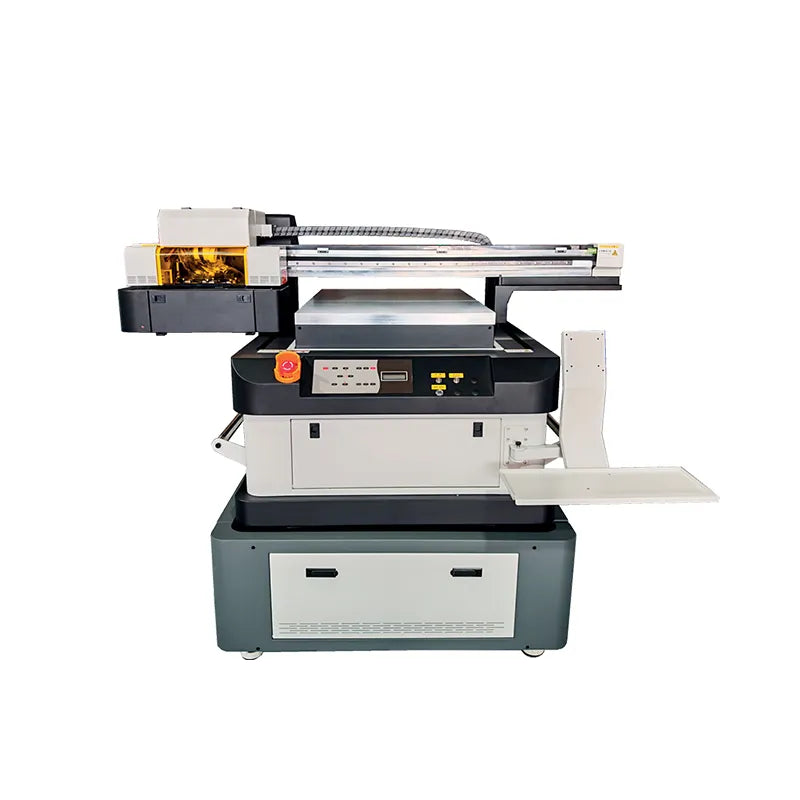
| Model | UFL6090 | Brand | ZYJJ | Print Width | 600 * 900mm | Ink Type | UV Ink | Cartridge | Continuous Ink Supply System |
| Printhead | I3200U1 * 3 | Ink Capacity | 1000ML | Ink Color | K,C,M,Y,W+V | Board Type | Honson | Maximum Height | 300mm |
| Print Direction | Bi / Uni-Direction | Printing Layers | Color / White / Varnish Printing | Work Environment Requirements |
Temperature 25-28°C Humidity ≤50% |
Printing Software | MainTop | Mapping Software | Photoprint |
| Connection Port | 1000 Megabit Ethernet Port |
Print Method | Flatbed Printing | Operating System | Windows 7/10 | Package Size | 2020 * 1700 * 1240mm | Body Size | 1850 * 1650 * 1550mm |
| Gross Weight | 450kg | Net Weight | 370kg | Power Req. | AC220V / 110V +/-10% 50/60HZ 2000W |
Printing Speed | 6Pass: 5.5m²/h 8Pass: 4m²/h |
Maximum Print Resolution | 2400dpi |
1
Multiple Printhead Configurations
Adopt 3 I3200 printheads, color, white, varnish separate output, fast speed, not easy to clogging.
2
High-Precision Parts Assembly
The whole machine is made of precision CNC aluminum alloy parts for more stable operation.
3
High-Pressure Suction Fan
The built-in, high-pressure suction fan at the base of the platform ensures substrate stays in place.
4
Enhanced Ink Supply System
Equipped with a 1000ml ink tank for longer printing; built-in white ink agitator.
5
Fast Curing Water-Cooled UV Lamps
Reduce the pressure of continuous operation by using fast curing water-cooled UV lamps.

1
2
3
4
5
6
7
8
9
10
6
Self-Elevating Printing Platform
Selected aluminum alloy honeycomb adsorption platform, strong adsorption, high flatness.
7
Crossbeam Y-Axis Motion System
Adopting a Y-axis gantry structure, the machine boasts smooth and precise movement.
8
One-Touch Start Switch Panel
One-click operation for white ink circulation, waste ink collection, and UV lamp curing.
9
High-Speed, Stable Board
Using the Honson board, a high-precision, high-speed, and stable network port board.
10
Expandable Workbench
Consumables can be placed or converted to touch-screen computers to speed up production.
Can be equipped with a visual recognition system to scan and identify the printable area of the substrate with one click.
Automatic Position And Size Recognition
Multiple objects of different sizes and locations can be scanned and recognized at one time, improving on-boarding speed.
Seamless Integration With Design Data
Enables quick layout by directly importing graphic files and dragging to match the outline of the substrate.
Adaptation To Irregular Objects Printing
Particularly useful for shaped, curved, and collage-type substrates, it can automatically recognize the boundaries and adjust the printing range.
Easy Operation
No Experience Needed.
Low Scrap Rate
Conserve Supplies, Materials.
Mixed Printing
Arbitrary Mixed Printing.

Embossed Logo Printing

Thermos Bottle Printing

Embossed Logo Printing

Thermos Bottle Printing

Metal Product

Silicone Product

Glass Product

Ceramic Crafts

Acrylic Product

Logo, Signage

Packaging Supplies

Personalized Gifts

Stationery, Sports Equipment

UFL6090 600mm UV Flatbed Printer
VS

UVDTF600 600mm UV DTF Printer
Direct Finished Product
Small Item Printing Suitable
Complex Surface Adaptation
Big Item Printing Suitable
Cylindrical Printing Efficiency
Precise Multi-Layer Overprinting
Adhesion Without Use Primer
Long-Term Outdoor Durability
Microprint Detailing Advantages

UFL6090
$8,900.00
Easy to integrate into production lines. Accommodates diverse expansion to meet the printing needs of more products.

FRYA3
$3,000.00
It can be used with AI cloud-based intelligent design for printing. Offering expansion, it can even print on clothing.

UFL330
$3,050.00
Small footprint, quick configuration, and easy material switching to create customized one-offs or small batches.
UFL6090
$8,900.00
Easy to integrate into production lines. Accommodates diverse expansion to meet the printing needs of more products.
FRYA3
$3,000.00
It can be used with AI cloud-based intelligent design for printing. Offering expansion, it can even print on clothing.
UFL330
$3,050.00
Small footprint, quick configuration, and easy material switching to create customized one-offs or small batches.
| Item | Qty | Item | Qty | Item | Qty |
|---|---|---|---|---|---|
| UFL6090 UV Printer | 1 Unit | Cleaning Kit + Hose + Spare Tube Fitting | 1 Set | Printhead I3200U | 3 Pcs |
| Product Manuals | 1 Pcs | Product Certificate + Warranty Card | 2 Pcs | Continuous Ink Supply System | 1 Set (Built-In) |
| Accessories Kit | 1 Kit | 1000ML Ink Set | 1 Set | Cleaning Fluid Moisturizer Liquid | 2 Bottle (1000ml Each) |
| Card USB Drive (Drivers/Software/Tutorials) |
2 Pcs (Software + Information) |
Data Cable | 1 Line | Power Cable | 1 Line |
💡 If buying a kit with a Powder Shaker or Oven, check its product page for the full list. This list applies to one printer only.
Frequently Asked Questions About Purchases
Check out our FAQ page where we've put together all the questions related to your purchase.
Does UFL6090 Support OEM/ODM?
Supports customization of appearance, color scheme, logo, interface language, nameplate and packaging; with MOQ and lead time requirements. For more information, please contact us.
Does It Support Installment?
This item is not eligible for installment payments.
Do You Offer Expedited Shipping?
It is available, but will incur different shipping costs depending on the area. Please consider this and contact us for clarification.
Are Additional Modules Included In This Product?
Adding additional modules requires you to contact us to purchase them, or you can purchase the corresponding modules on your own. The products on this page are for printing devices only and do not include modules.
How Do I Install Additional Expansion Device Modules?
Different modules have different installation methods, if you buy the corresponding module from us, we will help you install it and ship it to you. If the module is bigger, we will also provide the corresponding installation video so that you can install it by yourself.
Is This Visual Recognition Extension Also A Module?
Yes, it is also one of the modules and needs to be purchased separately.
Does Installing Mods Not Provided By This Product Affect The Warranty?
If a third-party module causes damage to a part covered by the warranty, then it is not eligible for warranty service. If the problem is with the part itself and not the module, then it can be covered under warranty.
What If The Printed Ink Is Not Drying?
This is usually because the parameters of the UV lamp are not set properly, try setting the wavelength to match the UV ink.
What Should I Do If My Printing Appears Blurry?
Please readjust the software settings if you experience blurring. If no blurring occurs with other settings, consider replacing the print pattern.
What If There Is A Lag In The Printing Process?
Please make sure that the data cable is connected properly and that there are no problems with the network.
What Should I Do If I Get An Error In Printing?
This is usually related to the print software settings, please adjust the software settings. If the problem persists after the software settings have been adjusted, the pattern does not meet the output requirements of the software.
What Checks Need To Be Done Before Using A UV Flatbed Printer?
You should check the status of the printhead, the ink level, whether the cleaning fluid is sufficient, whether the printing platform is flat, and whether the lamp is lit normally.
What Are The Protective Measures When Using UV Lamps?
It is strictly prohibited to look directly at the UV light source, and you should wear anti-UV goggles; avoid opening the hatch cover when the machine is working.
How To Determine The UV Lamp Needs To Be Replaced?
When curing is degraded, colors are dark, or prints show signs of not drying, the lamp energy should be tested and replaced at the manufacturer's recommended intervals.
Can I Use Non-Original Ink?
Yes, but you need to use an ink that matches the UV light band.
Frequently Asked Questions About Purchases
Check out our FAQ page where we've put together all the questions related to your purchase.
Does UFL6090 Support OEM/ODM?
Supports customization of appearance, color scheme, logo, interface language, nameplate and packaging; with MOQ and lead time requirements. For more information, please contact us.
Does It Support Installment?
This item is not eligible for installment payments.
Do You Offer Expedited Shipping?
It is available, but will incur different shipping costs depending on the area. Please consider this and contact us for clarification.
Are Additional Modules Included In This Product?
Adding additional modules requires you to contact us to purchase them, or you can purchase the corresponding modules on your own. The products on this page are for printing devices only and do not include modules.
How Do I Install Additional Expansion Device Modules?
Different modules have different installation methods, if you buy the corresponding module from us, we will help you install it and ship it to you. If the module is bigger, we will also provide the corresponding installation video so that you can install it by yourself.
Is This Visual Recognition Extension Also A Module?
Yes, it is also one of the modules and needs to be purchased separately.
Does Installing Mods Not Provided By This Product Affect The Warranty?
If a third-party module causes damage to a part covered by the warranty, then it is not eligible for warranty service. If the problem is with the part itself and not the module, then it can be covered under warranty.
What If The Printed Ink Is Not Drying?
This is usually because the parameters of the UV lamp are not set properly, try setting the wavelength to match the UV ink.
What Should I Do If My Printing Appears Blurry?
Please readjust the software settings if you experience blurring. If no blurring occurs with other settings, consider replacing the print pattern.
What If There Is A Lag In The Printing Process?
Please make sure that the data cable is connected properly and that there are no problems with the network.
What Should I Do If I Get An Error In Printing?
This is usually related to the print software settings, please adjust the software settings. If the problem persists after the software settings have been adjusted, the pattern does not meet the output requirements of the software.
What Checks Need To Be Done Before Using A UV Flatbed Printer?
You should check the status of the printhead, the ink level, whether the cleaning fluid is sufficient, whether the printing platform is flat, and whether the lamp is lit normally.
What Are The Protective Measures When Using UV Lamps?
It is strictly prohibited to look directly at the UV light source, and you should wear anti-UV goggles; avoid opening the hatch cover when the machine is working.
How To Determine The UV Lamp Needs To Be Replaced?
When curing is degraded, colors are dark, or prints show signs of not drying, the lamp energy should be tested and replaced at the manufacturer's recommended intervals.
Can I Use Non-Original Ink?
Yes, but you need to use an ink that matches the UV light band.

Medium-Sized Package
Anti-Collision Test

Medium-Sized Package
Violence Collision Test

Small-Sized Package
Anti-Collision Test

Warranty
Two-year limited warranty for the entire unit (excluding easily damaged parts).

Support
Remote diagnostics and video guidance, with a 12-hour response time.

Training
Start-up installation and basic training; provide maintenance SOPs and video tutorials.

Production
Professionally managed assembly ensures flawless execution from the outside in.

Accreditation
Provide CE / RoHS / ISO / EMC / LVD / OEKO TEX Verified certificates.

Inspection
Comprehensive Testing to Ensure Reliable and Consistent Performance.