


Medium-Sized Package
Anti-Collision Test
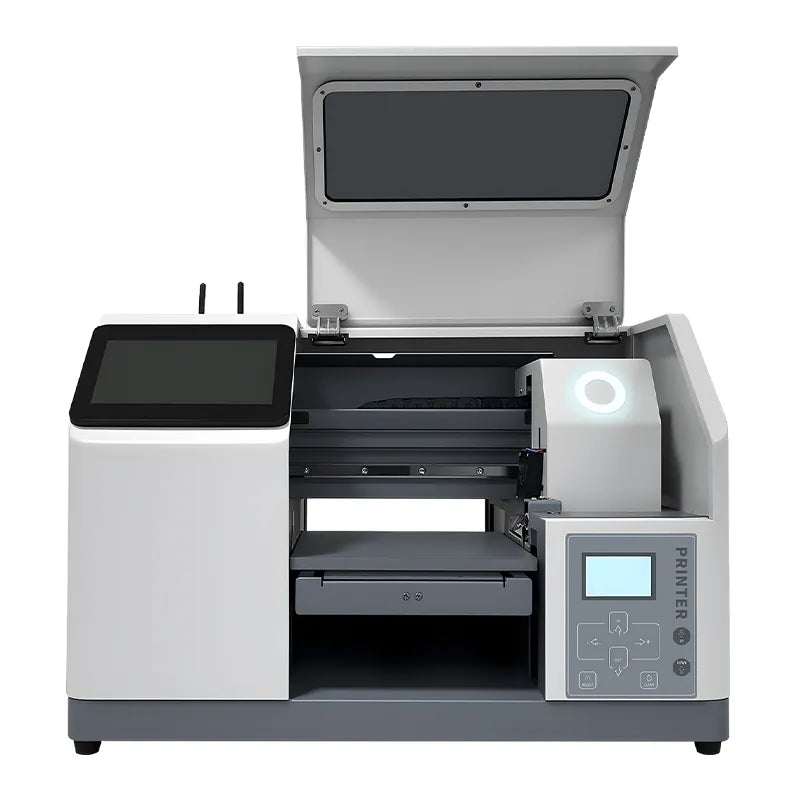
| Model | FRYA5Y | Brand | ZYJJ | Print Width | A5Y: 210 * 240mm A4: 210 * 340mm |
Ink Type | UV Ink |
| Printhead | XP600 | Ink Capacity | 300ML | Ink Color | A5Y: K,C,M,Y,W A4: K,C,M,Y,W,W |
Maximum Height | 60mm |
| Work Environment Requirements |
Temperature 25-28°C Humidity ≤50% |
Printing Software | REELEYIN | Motherboard | Better Print | Power Req. | AC220V / 110V +/-10% 50/60HZ 100W |
| Print Method | Flatbed Printing | Operating System | Built-in | Package Size | A5Y: 670 * 480 * 580mm A4: 660 * 570 * 580mm |
Body Size | A5Y: 560 * 370 * 385mm A4: 560 * 460 * 385mm |
| Gross Weight | A5Y: 46kg A4: 48kg |
Net Weight | A5Y: 33kg A4: 34kg |
Printing Speed | 8Pass: 1.25m²/h 12Pass: 0.83m²/h |
Maximum Print Resolution | 1440dpi |
1
Smart Ink Capacity Alerts
The ink carriage features an ink level indicator that turns red and issues a reminder when ink is low.
2
Smart Waste Ink Alarms
The ink cartridge has a built-in waste ink tank, and a sound alert will notify you when it's nearly full.
3
High Precision Sliding Rail
High-precision alloy rails for reduced printing noise and smooth operation.
4
Built-In Operating System
Accepts commands, allows DIY customization and settings, and adapts to the interface language.

1
2
3
4
5
6
7
8
5
Removable Printing Molds
The default is a clothing mold, but other molds can be installed to unlock more printing applications.
6
Infrared Smart Sensor System
Intelligent detection of the height of the material, with the lifting system to realize automatic lifting.
7
Built-in Cloud Smart Panel Receiver
Can be connected to a printer or used with an operating panel for printing.
8
Customizable Exterior Colors, Styles
Any customized exterior color and style, airbrushing are available. Less MOQ requirement.
This extension panel enables self-service printing. Simply provide the necessary printing materials, and customers can place orders themselves to complete the transaction.
Self-Service Ordering & Printing Operations
Through the intelligent interactive expansion panel, users can complete the document selection, parameter setting and ordering process without manual assistance, realizing a true one-stop self-service printing, intuitive and efficient operation.
AI Cloud Intelligence Assisted Style Design
Offers a wealth of free design resources and utilizes AI cloud intelligence to create stylized designs based on uploaded images. It also supports in-app shooting with a variety of selectable styles.
UI Customization, Workflow Customization
Direct UI customization in various global languages, with personalized operational preferences. As only Chinese and English are available by default, please contact us if you require such a smart expansion panel. It is currently not available in the store.
Real scenes from our daily manufacturing operations.


| Item | Qty | Item | Qty | Item | Qty |
|---|---|---|---|---|---|
| FRYA5 UV Printer | 1 Unit | Cleaning Kit + Hose + Spare Tube Fitting | 1 Set | Printhead XP600 | 1 Pcs |
| Waste Ink Device | 1 Set | Ink Damper | 18 Pcs (12 Included, 6 Spare) |
Accessories Kit | 1 Kit |
| Product Manuals | 1 Pcs | Product Certificate + Warranty Card | 2 Pcs | Multi-Application Mould + Expansion Panel Receiver | 2 Pcs |
| Card USB Drive (Drivers/Software/Tutorials) |
2 Pcs (Software + Information) |
Data Cable | 1 Line | Power Cable | 1 Line |
💡 If buying a kit with a Powder Shaker or Oven, check its product page for the full list. This list applies to one printer only.
Frequently Asked Questions About Purchases
Check out our FAQ page where we've put together all the questions related to your purchase.
Do You Get A Free Smart Extension Panel With This Purchase?
No, because the expansion panel requires customization, it is not included in the item. If you need this expansion panel, please contact us for customization. There is no charge for customization, but you will need to purchase the unit.
Is There A Budget Limit For Purchasing Special Appearance Styles?
There is no charge for color changes, any color will do. For airbrushing and sheet metal modifications, there is an additional charge based on materials used.
Do You Offer Expedited Shipping?
It is available, but will incur different shipping costs depending on the area. Please consider this and contact us for clarification.
Are Additional Modules Included In This Product?
Multi-app printing mold and extension panel receiver are included by default. Expansion panel can increase the signal distance for cell phone connection app when there is no expansion panel.
How Do I Install Additional Expansion Device Modules?
Different modules have different installation methods, if you buy the corresponding module from us, we will help you install it and ship it to you. If the module is bigger, we will also provide the corresponding installation video so that you can install it by yourself.
Is There A Universal Print Mold?
Due to its limited printing area, the A5 model does not currently support the universal mold. We recommend purchasing the A3 model.
Does Installing Mods Not Provided By This Product Affect The Warranty?
If a third-party module causes damage to a part covered by the warranty, then it is not eligible for warranty service. If the problem is with the part itself and not the module, then it can be covered under warranty.
What If The Printed Ink Is Not Drying?
This is usually because the parameters of the UV lamp are not set properly, try setting the wavelength to match the UV ink.
What Should I Do If My Printing Appears Blurry?
Please readjust the software settings if you experience blurring. If no blurring occurs with other settings, consider replacing the print pattern.
What If There Is A Lag In The Printing Process?
Please make sure that the data cable is connected properly and that there are no problems with the network.
What Should I Do If I Get An Error In Printing?
This is usually related to the print software settings, please adjust the software settings. If the problem persists after the software settings have been adjusted, the pattern does not meet the output requirements of the software.
What Checks Need To Be Done Before Using A UV Flatbed Printer?
You should check the status of the printhead, the ink level, whether the cleaning fluid is sufficient, whether the printing platform is flat, and whether the lamp is lit normally.
What Are The Protective Measures When Using UV Lamps?
It is strictly prohibited to look directly at the UV light source, and you should wear anti-UV goggles; avoid opening the hatch cover when the machine is working.
How To Determine The UV Lamp Needs To Be Replaced?
When curing is degraded, colors are dark, or prints show signs of not drying, the lamp energy should be tested and replaced at the manufacturer's recommended intervals.
Can I Use Non-Original Ink?
Yes, but you need to use an ink that matches the UV light band.
Frequently Asked Questions About Purchases
Check out our FAQ page where we've put together all the questions related to your purchase.
Do You Get A Free Smart Extension Panel With This Purchase?
No, because the expansion panel requires customization, it is not included in the item. If you need this expansion panel, please contact us for customization. There is no charge for customization, but you will need to purchase the unit.
Is There A Budget Limit For Purchasing Special Appearance Styles?
There is no charge for color changes, any color will do. For airbrushing and sheet metal modifications, there is an additional charge based on materials used.
Do You Offer Expedited Shipping?
It is available, but will incur different shipping costs depending on the area. Please consider this and contact us for clarification.
Are Additional Modules Included In This Product?
Multi-app printing mold and extension panel receiver are included by default. Expansion panel can increase the signal distance for cell phone connection app when there is no expansion panel.
How Do I Install Additional Expansion Device Modules?
Different modules have different installation methods, if you buy the corresponding module from us, we will help you install it and ship it to you. If the module is bigger, we will also provide the corresponding installation video so that you can install it by yourself.
Is There A Universal Print Mold?
Due to its limited printing area, the A5 model does not currently support the universal mold. We recommend purchasing the A3 model.
Does Installing Mods Not Provided By This Product Affect The Warranty?
If a third-party module causes damage to a part covered by the warranty, then it is not eligible for warranty service. If the problem is with the part itself and not the module, then it can be covered under warranty.
What If The Printed Ink Is Not Drying?
This is usually because the parameters of the UV lamp are not set properly, try setting the wavelength to match the UV ink.
What Should I Do If My Printing Appears Blurry?
Please readjust the software settings if you experience blurring. If no blurring occurs with other settings, consider replacing the print pattern.
What If There Is A Lag In The Printing Process?
Please make sure that the data cable is connected properly and that there are no problems with the network.
What Should I Do If I Get An Error In Printing?
This is usually related to the print software settings, please adjust the software settings. If the problem persists after the software settings have been adjusted, the pattern does not meet the output requirements of the software.
What Checks Need To Be Done Before Using A UV Flatbed Printer?
You should check the status of the printhead, the ink level, whether the cleaning fluid is sufficient, whether the printing platform is flat, and whether the lamp is lit normally.
What Are The Protective Measures When Using UV Lamps?
It is strictly prohibited to look directly at the UV light source, and you should wear anti-UV goggles; avoid opening the hatch cover when the machine is working.
How To Determine The UV Lamp Needs To Be Replaced?
When curing is degraded, colors are dark, or prints show signs of not drying, the lamp energy should be tested and replaced at the manufacturer's recommended intervals.
Can I Use Non-Original Ink?
Yes, but you need to use an ink that matches the UV light band.

Medium-Sized Package
Anti-Collision Test

Medium-Sized Package
Violence Collision Test

Small-Sized Package
Anti-Collision Test

Warranty
Two-year limited warranty for the entire unit (excluding easily damaged parts).

Support
Remote diagnostics and video guidance, with a 12-hour response time.

Training
Start-up installation and basic training; provide maintenance SOPs and video tutorials.

Production
Professionally managed assembly ensures flawless execution from the outside in.

Accreditation
Provide CE / RoHS / ISO / EMC / LVD / OEKO TEX Verified certificates.

Inspection
Comprehensive Testing to Ensure Reliable and Consistent Performance.